WinRAR Download - Unzip with Ease
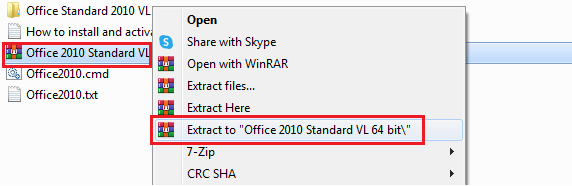
Are you tired of struggling with complex and time-consuming file extraction processes? Look no further! In this article, we will delve into the world of WinRAR and explore how this powerful software can help you unzip files with ease. Whether you are a tech-savvy professional or a casual computer user, WinRAR is the ultimate solution for all your file compression and decompression needs.
What is WinRAR?
WinRAR is a popular file archiver and compressor that allows users to compress multiple files into one convenient package, known as an archive. This software also enables users to extract the content of compressed files effortlessly. With its user-friendly interface and extensive functionality, WinRAR has become the go-to choice for millions of users worldwide.
Why Choose WinRAR for File Extraction?
When it comes to file extraction, WinRAR stands out from the competition. Here are some compelling reasons why you should choose WinRAR:
- Efficiency: WinRAR boasts an exceptional compression ratio, allowing you to save valuable disk space by reducing file sizes significantly.
- Compatibility: Whether you are dealing with ZIP, RAR, 7Z, or other popular archive formats, WinRAR supports them all, ensuring seamless extraction.
- Speed: With its high-speed compression and extraction capabilities, WinRAR ensures that you spend less time waiting and more time utilizing your files.
- Security: WinRAR offers advanced encryption options, protecting your sensitive data from unauthorized access.
- Flexibility: WinRAR allows you to split large archives into smaller parts, making it easier to store or share them across different platforms.
How to Download WinRAR?
Downloading WinRAR is a straightforward process. Follow these simple steps to get started:
- Open your preferred web browser and navigate to the official WinRAR website.
- Locate the "Downloads" section on the website and click on it.
- Choose the appropriate version of WinRAR for your operating system (Windows, macOS, or Linux).
- Click on the provided download link to initiate the download.
- Once the download is complete, locate the downloaded file and double-click on it to start the installation process.
- Follow the on-screen instructions to complete the installation.
- After installation, you are now ready to unleash the power of WinRAR!
Using WinRAR to Unzip Files
Unzipping files with WinRAR is a breeze. Here's a step-by-step guide to help you get started:
- Locate the compressed file you want to unzip.
- Right-click on the file and select "Extract Here" from the context menu. Alternatively, you can choose a specific destination folder by selecting "Extract to" and specifying the desired location.
- WinRAR will then extract the contents of the compressed file to the specified location, allowing you to access and utilize the files as needed.
Additional WinRAR Features
Besides its exceptional file extraction capabilities, WinRAR offers a range of additional features that enhance your archiving experience:
- File Compression: WinRAR allows you to compress multiple files and folders into a single archive, making it easier to manage and share them.
- Password Protection: You can secure your archives by setting passwords, ensuring that only authorized individuals can access the contents.
- Repair Damaged Archives: WinRAR includes a built-in feature to repair corrupted or damaged archives, minimizing the risk of losing important data.
- Convert Archive Formats: With WinRAR, you can convert archives from one format to another, providing flexibility and compatibility.
- Integration with Windows Explorer: WinRAR seamlessly integrates with Windows Explorer, allowing you to perform archiving tasks with a simple right-click.
Conclusion
WinRAR is undoubtedly a game-changer in the world of file compression and extraction. With its exceptional efficiency, compatibility, speed, security, and flexibility, it surpasses other archiving software options. Downloading WinRAR is a breeze, and once installed, you can easily unzip files with just a few clicks. Additionally, WinRAR offers a range of advanced features that make your archiving experience even more convenient and secure.
So, if you're tired of cumbersome file extraction processes, it's time to make the switch to WinRAR. Unleash the power of this remarkable software and experience the ease and efficiency of unzipping files like never before!


Comments
Post a Comment