7-Zip Download - Compression Simplified
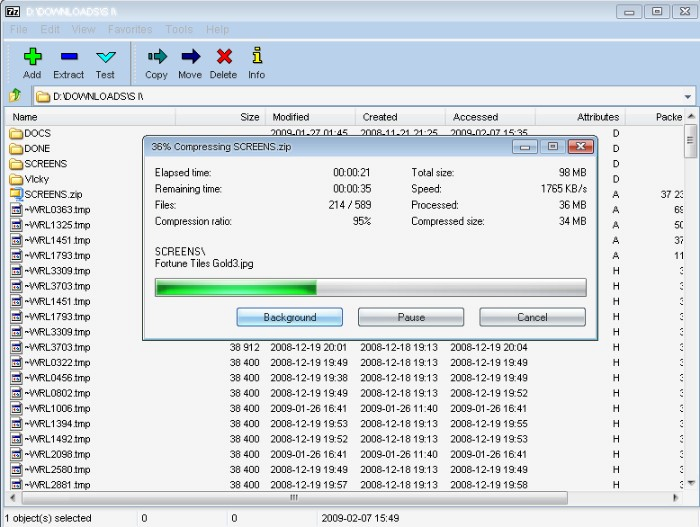
Are you tired of struggling with large file sizes while sharing or storing data? Look no further than 7-Zip, a powerful and user-friendly compression tool that simplifies the process of compressing and decompressing files. In this article, we will dive into the world of 7-Zip and explore how it can make your life easier by reducing file sizes without compromising on quality.
The Need for Compression
Before we delve into the details of 7-Zip, let's understand why compression is essential. In today's digital age, we deal with enormous amounts of data, including documents, images, videos, and more. These files often take up significant storage space and can be cumbersome to transfer or share over the internet.
Compression allows us to reduce the size of these files without losing any vital information. By compressing files, we can save storage space, enhance transfer speeds, and improve overall efficiency. This is where 7-Zip comes to the rescue.
Introducing 7-Zip
7-Zip is a free and open-source file archiver that supports a wide range of file formats. With its high compression ratio, it outperforms many commercial alternatives while remaining completely free. The software is available for Windows, macOS, and Linux, making it accessible to users across various platforms.
One of the key features that sets 7-Zip apart is its support for the 7z format, which offers significantly better compression than traditional ZIP formats. This means that you can reduce file sizes to a greater extent without compromising on quality.
Simple Installation Process
Getting started with 7-Zip is a breeze. The installation process is straightforward and hassle-free. Simply visit the official 7-Zip website and download the appropriate version for your operating system. Once the download is complete, run the installer, follow the on-screen instructions, and you're good to go.
User-Friendly Interface
7-Zip boasts a sleek and intuitive user interface, making it easy for both beginners and experienced users to navigate the software. The straightforward design ensures that you can start compressing files right away without any steep learning curve.
Compression Made Easy
When it comes to compressing files, 7-Zip offers a wide range of options to suit your needs. You can compress files individually or create archives containing multiple files and folders. The software supports various compression methods, including LZMA, LZMA2, and Deflate, allowing you to choose the best option for your requirements.
Furthermore, 7-Zip allows you to split large archives into smaller parts, making it easier to transfer or share files over limited bandwidth connections. This feature comes in handy when dealing with large multimedia files or when sending files via email.
Decompression with Ease
Not only can 7-Zip compress files, but it also excels at decompressing them. Whether you receive a compressed file from a colleague or download one from the internet, 7-Zip can handle it effortlessly. Simply right-click on the compressed file, select the "Extract Here" option, and 7-Zip will quickly extract the contents to your desired location.
Compatibility and Integration
7-Zip supports an extensive range of file formats, including popular formats like ZIP, RAR, TAR, GZIP, and more. This ensures seamless compatibility with files compressed using other software. Additionally, 7-Zip integrates seamlessly with the Windows context menu, allowing you to compress or decompress files with a simple right-click.
Advanced Features and Customization
Beyond the basic compression and decompression functionalities, 7-Zip offers advanced features to cater to power users. You can choose the compression level, password-protect your archives, and even create self-extracting archives for easy distribution. The software also supports command-line operations, making it ideal for automation and scripting purposes.
Community Support and Development
7-Zip is an open-source software, which means it benefits from a dedicated community of developers and enthusiasts. Regular updates and bug fixes ensure that the software remains up to date and reliable. The community actively contributes to the development of 7-Zip, resulting in a feature-rich and robust tool.
Conclusion
In conclusion, 7-Zip is a powerful and versatile compression tool that simplifies the process of compressing and decompressing files. With its high compression ratio, user-friendly interface, and extensive functionality, it is the go-to choice for individuals and businesses alike. Download 7-Zip today and experience the benefits of compression simplified!


Comments
Post a Comment