Adobe Premiere Pro Download - Craft Your Videos
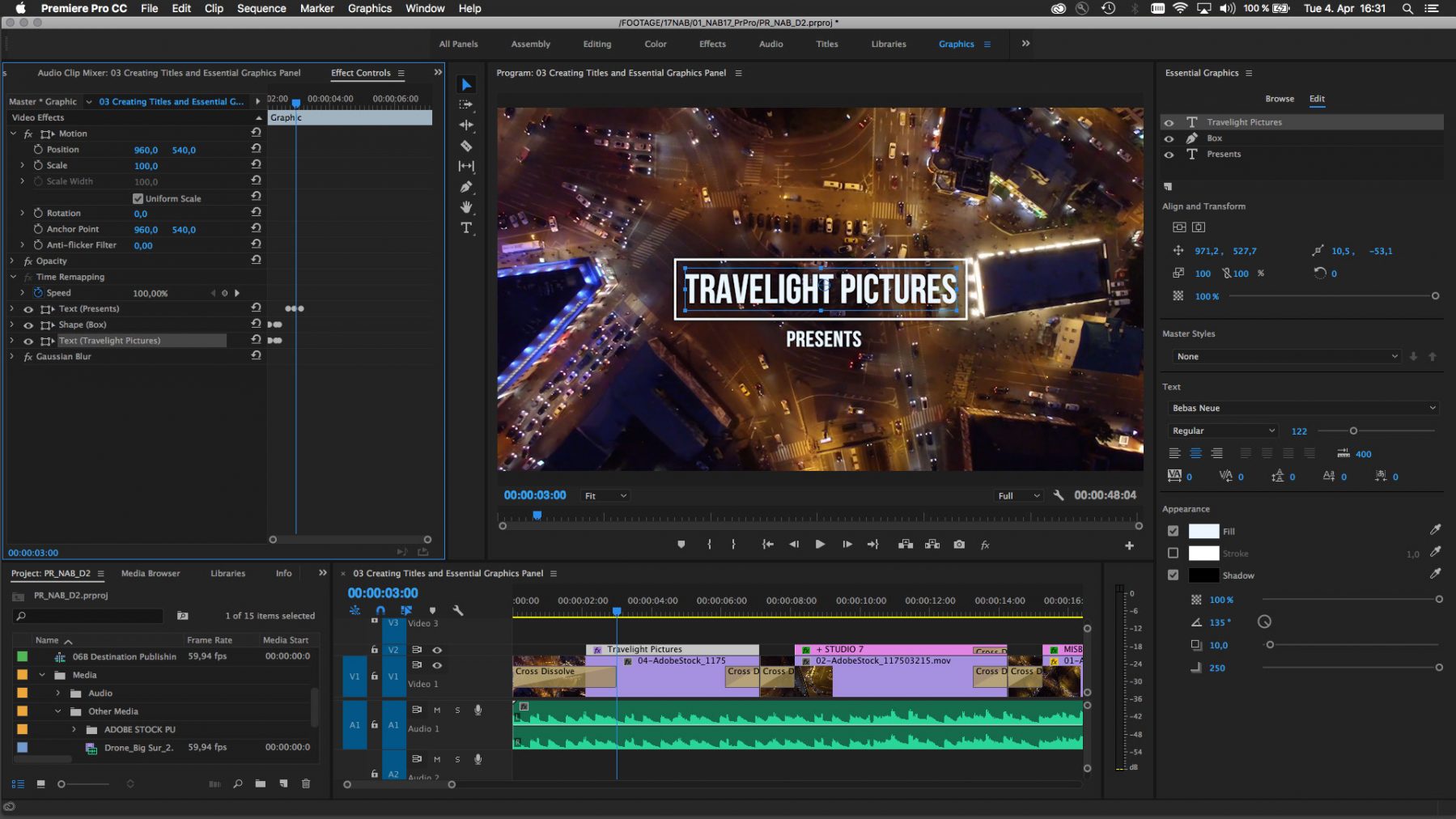
Are you a video enthusiast looking to take your editing skills to the next level? Look no further than Adobe Premiere Pro. This powerful video editing software has become the industry standard for professional filmmakers and content creators. From its intuitive interface to its vast array of features, Adobe Premiere Pro is the go-to choice for crafting stunning videos. In this article, we will explore the process of downloading Adobe Premiere Pro and how it can help you unleash your creativity.
The Power of Adobe Premiere Pro
Adobe Premiere Pro is a comprehensive video editing software that offers an extensive range of tools and features to help you bring your vision to life. Whether you are a beginner or an experienced editor, Adobe Premiere Pro provides the flexibility and precision you need to create captivating videos.
Intuitive User Interface
One of the standout features of Adobe Premiere Pro is its user-friendly interface. Designed with efficiency in mind, the software allows you to navigate seamlessly through your project, making it easy to organize your footage, apply effects, and make adjustments. The intuitive timeline layout provides a visual representation of your video, allowing you to precisely edit each frame.
Advanced Editing Tools
Adobe Premiere Pro offers a wide range of advanced editing tools to enhance your videos. From basic trimming and cutting to advanced techniques such as color correction and audio editing, this software has it all. With its robust set of tools, you can easily achieve professional-grade results and bring your creative ideas to life.
Efficient Workflow
Time is of the essence when it comes to video editing. Adobe Premiere Pro understands this and provides a streamlined workflow to help you work more efficiently. The software offers seamless integration with other Adobe Creative Cloud applications, allowing you to import and export files effortlessly. Additionally, the ability to customize keyboard shortcuts and create presets allows you to speed up your editing process and focus on what matters most - crafting your videos.
Downloading Adobe Premiere Pro
Now that we have explored the power of Adobe Premiere Pro, let's discuss how you can download this incredible software.
Step 1: Visit the Adobe Website
To begin the download process, visit the official Adobe website. Navigate to the Adobe Premiere Pro page, where you will find detailed information about the software's features and pricing plans.
Step 2: Choose a Subscription Plan
Adobe Premiere Pro is available through a subscription-based model. Select the plan that best suits your needs and budget. Adobe offers various options, including individual plans and plans for businesses and students. Choose the plan that aligns with your requirements and click on the "Buy Now" button.
Step 3: Create or Sign in to Your Adobe Account
If you already have an Adobe account, sign in using your credentials. If not, you will need to create a new account. Fill in the required information and proceed to the next step.
Step 4: Complete the Payment Process
Once you have signed in or created your Adobe account, you will be prompted to complete the payment process. Review the details of your chosen plan and enter your payment information. Adobe offers secure payment options to ensure a smooth and hassle-free transaction.
Step 5: Download and Install Adobe Creative Cloud
After successfully completing the payment process, you will be directed to download Adobe Creative Cloud, which is the hub for managing all Adobe applications. Follow the on-screen instructions to download and install Adobe Creative Cloud on your computer.
Step 6: Access Adobe Premiere Pro
Once Adobe Creative Cloud is installed, open the application and sign in using your Adobe account credentials. From the Creative Cloud dashboard, locate Adobe Premiere Pro and click on the "Install" button. The software will begin downloading and installing on your computer.
Start Crafting Your Videos with Adobe Premiere Pro
Now that you have successfully downloaded and installed Adobe Premiere Pro, it's time to unleash your creativity and start crafting your videos. With its powerful features and intuitive interface, Adobe Premiere Pro empowers you to bring your vision to life and captivate your audience.
Begin by importing your footage into Adobe Premiere Pro. The software supports a wide range of file formats, ensuring compatibility with various cameras and devices. Organize your clips in the project panel, and then drag and drop them onto the timeline to start building your video.
Use the advanced editing tools offered by Adobe Premiere Pro to refine your footage. Trim and cut clips, apply transitions, and experiment with different effects to achieve the desired look and feel. The software also provides precise control over audio, allowing you to adjust levels, apply filters, and mix soundtracks effortlessly.
Furthermore, Adobe Premiere Pro offers a plethora of options for color grading and correction. Enhance the visual appeal of your videos by adjusting brightness, contrast, saturation, and more. The software also supports various color grading plugins, enabling you to achieve specific looks and styles.
Once you are satisfied with your edits, it's time to export your masterpiece. Adobe Premiere Pro offers a wide range of export options, allowing you to choose the desired format, resolution, and settings. Whether you are sharing your video online or preparing it for broadcast, Adobe Premiere Pro ensures optimal quality and compatibility.
Conclusion
Adobe Premiere Pro is a game-changer when it comes to video editing. With its powerful features, intuitive interface, and efficient workflow, this software is a must-have for any aspiring or professional video editor. By following the simple steps outlined in this article, you can easily download Adobe Premiere Pro and embark on your journey to craft stunning videos that captivate your audience.
Unleash your creativity, download Adobe Premiere Pro today, and let your videos speak volumes!


Comments
Post a Comment